
Minimizing query costs
The HTTP Archive dataset is large and complex, and it’s easy to write queries that are slow and expensive. All BigQuery users have a free quota of 1 TB per month. To stretch your free quota as far as possible, you’ll want to minimize the amount of data that your queries scan. This guide provides some practical tips for minimizing the cost of querying the HTTP Archive dataset.
Use cluster columns
Section titled “Use cluster columns”| Table | Partitioned by | Clustered by |
|---|---|---|
httparchive.crawl.pages |
date |
1.client2. is_root_page3. rank4. page |
httparchive.crawl.requests |
date |
1.client2. is_root_page3. type4. rank |
For example, the httparchive.crawl.pages table is partitioned by date and clustered by the client, is_root_page, rank and page columns, which means that queries that filter on these columns will be much faster and cheaper than queries that don’t.
Use the RECORD columns
Section titled “Use the RECORD columns”Some of our columns in the table are structured RECORD columns. When querying these you only pay for the costs of the records needed.
SELECT custom_metricsFROM `httparchive.crawl.pages`WHERE date = '2023-05-01' AND client = 'desktop' AND rank <= 1000This query reads every custom_metrics column.
The same query looking at just the a11y custom metrics reads only that one column, at a small fraction of the cost:
SELECT custom_metrics.a11yFROM `httparchive.crawl.pages`WHERE date = '2023-05-01' AND client = 'desktop' AND rank <= 1000Use TABLESAMPLE
Section titled “Use TABLESAMPLE”The TABLESAMPLE clause allows you to sample a table without scanning the entire table. This is useful for getting a rough idea of the data in a table before running a more expensive query.
For example, without TABLESAMPLE:
SELECT custom_metrics.other.avg_dom_depthFROM `httparchive.crawl.pages`WHERE date = '2023-05-01' AND client = 'desktop'This query reads the column for every desktop page in the month, which is hundreds of gigabytes.
The same query with TABLESAMPLE at 0.01% is much cheaper:
SELECT custom_metrics.other.avg_dom_depthFROM `httparchive.crawl.pages` TABLESAMPLE SYSTEM (0.01 PERCENT)WHERE date = '2023-05-01' AND client = 'desktop'This query reads only a small fraction of that.
The 0.01% of rows that are sampled are chosen randomly, so the results of the query will be different each time it’s run.
Use RANK
Section titled “Use RANK”An alternative to TABLESAMPLE, to get a consistent set of data returning for a subset of data, is to use the rank column as mentioned previously. For the top 1,000 or even 10,000 sites:
SELECT custom_metrics.other.avg_dom_depthFROM `httparchive.crawl.pages`WHERE date = '2023-05-01' AND client = 'desktop' AND rank <= 1000This consistency is an advantage over TABLESAMPLE, and the estimate reflects the rank filter, so you can see the cost before running. Raise the limit (for example to rank <= 10000) and check the estimate again before moving to a full run.
Use the sample_data dataset
Section titled “Use the sample_data dataset”The sample_data dataset contains 10k subsets of the full pages and requests tables. These tables are useful for testing queries before running them on the full dataset, without the risk of incurring a large query cost.
Table names correspond to their full-size counterparts of the form [table]_10k for crawl.pages and crawl.requests tables. For example, to query the summary data for the subset of 10k pages, you would use the httparchive.sample_data.pages_10k table.
As rank is part of the clustering of the tables, you don’t need the sample_data dataset to keep costs down. It is still useful as a small, fixed set of pages for developing query logic. The tables are rebuilt with each crawl and hold only the latest month.
Whether to use TABLESAMPLE, rank, or sample_data
Section titled “Whether to use TABLESAMPLE, rank, or sample_data”This comes down largely to a matter of personal preference. Each has their advantage and disadvantage.
| Advantage | TABLESAMPLE |
rank |
sample_data |
|---|---|---|---|
| Consistency of results returned | ❌ | ✅ | ✅ (if run in same month) |
| Accurate estimates | ✅ | ✅ | ✅ |
| Ease of commenting out for full run | ✅ | ✅ | ❌ |
| Allows querying of any months | ✅ | ✅ | ❌ (previous month only) |
| Allows variable sample size | ✅ | ✅ | ❌ |
With accurate estimates, rank is usually the best choice: consistent results, any month, and easy to remove for the full run. Use TABLESAMPLE when you need a random sample instead of the most popular sites.
Use table previews
Section titled “Use table previews”BigQuery allows you to preview entire rows of a table without incurring a query cost. This is useful for getting a rough idea of the data in a table before running a more expensive query.
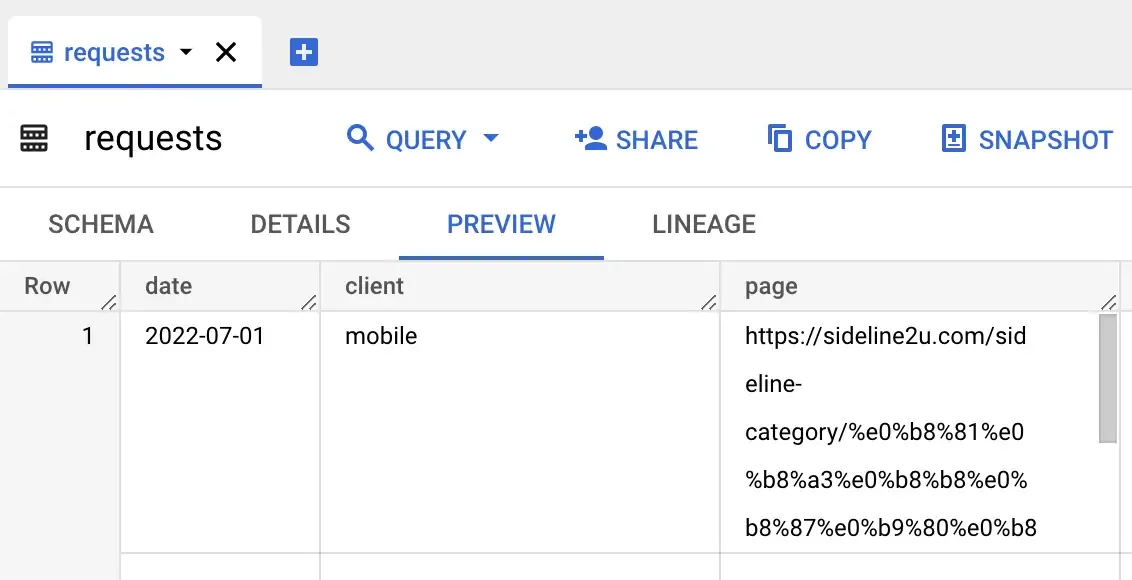
To access the preview, click on a table name from the workspace explorer and select the Preview tab.
Note that generating the preview may be slow for these tables as they include large payloads. Also note that the text values are truncated by default, so you will need to expand the field to get the full value.